
Here is a freely available plugin to make the Nokia 6300 work using iSync, and it is actually fairly easy to make a such plugin, which encompass the solution described in my previous post on the Nokia 6300 iSync issue.
Here is what to do:
- Download the Nokia 6300 iSync plugin
“UPDATED 28MAY2008″ - Extract the Nokia6300.phoneplugin.zip (your browser might do it for you).
- Quit iSync if its running
- Double click the Nokia 6300 Plugin
- Drag and drop the green folder on the blue one
[ad code=1 align=left]
-
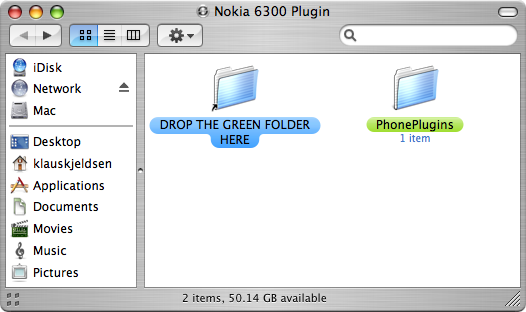
- Start iSync, and the Nokia 6300 should be supported
Additional notes and issues:
- iSync only synchronizes the contacts you have on the phone and not on the SIM-card. View this comment.
- Additional Mac software for Nokia Phones

In step #6 is says “Start iSync, and the Nokia 6300 should be supported.” Where is the start button for iSync?
How do you start iSync?
What a great piece of work, you have made using my MacBook Pro even more of a joy. My contacts and calendars have all been iSync-ed to my 6300 and so quickly, wow!
Hmm … the download link doesn’t work! error 404-not found!
Sorry for the inconvenience, the download link should work again in a very short while…
als ik de plugin voor de nokia 6300 probeer te downloaden krijg ik een pagina met page not found. kan iemand mij het bestand mailen?
tnx Michiel
when I try to download the nokia 6300 plugin via the link on top of this page I continually receive: file nog found, could someone send me another link?
tnx
Nokia 6300 iSync Plugin
I am really not an expert in IT but I did it based on the explanation.
I can’t believe it and I don’t know how it works but my adressbook and my calender synchronises.
Having before a Nokia E50 (with which I was completly disappointed) I now got an Nokia 6300. But the isynch for my Mac (Generation Jan 2009) didn’t work.
Now it’s working. Thank you very much. Bernhard
Last questions:
1. How can I delete the tiff file from my E50 in the isynch Menü?
I couldn’t find the tiff file but the picture is still there.
2. Question concerning my understanding:
If I use the Bluetooth function of my Nokia 6300 both Hardware (Mac and Nokia 6300) get to know each other but the there is no synch. Only with using isync there is an exchange of data. I don’t understand this.
I’ve just downloaded your plugin, and it’s worked like a dream. We’re all in your debt, Klaus.
However, I’m new to synching my phone and my Mac, and would be grateful for a piece of advice.
In order that I avoid the computer trying to send back my whole .Mac addressbook to the phone (or to a new phone I may buy)at some future point when I I opened my .Mac addressbook, created a folder I called Nokia6300, and clicked to synch my phone with that folder alone.
When it was done, I found that the new folder was empty, and the contacts from my phone were accessible on my Mac only if I clicked on All in my Addressbook. So if I synch next time with my current phone, or need to download my numbers to a new phone, how do I make sure it’s only the numbers that are sent over from my .Mac addressbook, instead of all the data it contains.
Thanks in advance for all advice offered.
Paul
SORRY, I LEFT A WORD OUT OF MY THIRD PARAGRAPH, MAKING IT INCOMPREHENSIBLE. IT SHOULD READ:
In order that I avoid the computer trying to send back my whole .Mac addressbook to the phone (or to a new phone I may buy)at some future point when I synch, I opened my .Mac addressbook, created a folder I called Nokia6300, and clicked to synch my phone with that folder alone.
Thanks for this worked like a charm :)
Thank You a lot, it works brilliantly!
Ilya
great! thanks a lot for that useful plugin
youre the man
Works very well.
Thank you man!
Pingback: imBuch.de » Blog Archive » iSync-Plug-in für Nokia 6300
Works perfectly.
Thank’s
Est-il possible de transférer les sms (reçus et enregistrés) d’un Nokia 6300 vers macbook?? Si oui, comment? Merci. Delphine
Pingback: Mechanical Marksy » Blog Archive » Nokia 6300/6303/6700 and OS X
Perfect. Even works with Snow Leopard.
Worked on SL for me too! thanks heaps!
Worked for me too on SL! thanks heaps.
Hei,
thank you for this great Plugin!!!
thank you sooooooo much! great! wunderful and easy Plugin!!!!!
I have isync 3.0.2 and I am getting the error message “Unable to locate the plugin for this phone.”
Pingback: Nokia 6300 mit Mac OS X Snow Leopard synchronisieren - TweakPC Hardware Forum
kudos! worked perfect on snow leopard
Hi Klaus
I’m having problems with your plug-in when using it on a Network Account on Leopard Server. i.e. the user’s homedir is on a file server.
Adding the phone to iSync works fine, but every sync fails (towards the end) with a unknown error.
Any ideas? Thank you very much in any case for your work.
– Clemens
it doesnt work…
i dont know why…
there is alwasy an error: the plugin is doesnt work with this version of isync…
thanks
Thanks a lot!! Great!
Thanks for plugin. Works great with ibook g4 leopard / isync 3.0.2. But not so good with Mac mini G4 intel snow leopard / isync 3.1.0 when i get calendar ok but contact details are missing apart from names and phone numbers (no e.mail or address)
I would be grateful for any solutions.
thanks again.
Thank you for you Nokia 6300 isync plugin. Worked right out the download on a late 2009 iMac 21 inches with OS X 10.6.2. Greetings to Denmark.
Works beautifully!!!
Thanks a lot. :-)
Thanks for the plugin! It saved my day!
I just sent my iPhone to repair, and had to use my wife’s old Nokia 6300. I previously installed the plugin manually, so I knew it would take me about an hour – which I didn’t have. But thanks to this plugin, my address book was synced in 10 mins!!
Thanks again!!…
I’m very glad to tell you that I was able to sync my little, old, bricky and simple Nokia 2760 thanks to your files, all I did was to replace 6300 with 2760 in all the files of the plugin. Voila!
Thanks, I owe you a beer :)
I’m not clever and I just did it! Fantastic! Thanks!
To Daneehh
I have also Nokia 2760 did you just change one file replacing 6300 under Nokia plug in because you said all files thanks for clarification
Ciao
thanx for your precious help…..
I owe you some kebab
Many thanks – I have a Nokia X3 which is also a Series 40 phone. I followed your advice and changed the XML to add a section for: Nokia X3-00
It works like a champ! (using iSync 3.0.2)
Thank you!
Wollte mich auch nur kurz für deine Arbeit bedanken!
Works perfect!
Pingback: Nokia 6300 synct met Mac | Floris' krabbels
Klaus,
Wonderfull! Many thanks!
Regards
Henri
This works perfectly! Thank you!!
Seems to work like a dream. Thanks a lot, D
YESSSSSSSSSSS. IT WORKSSSSS!!!
Thank you very much. This was the most user friendly solution. It works perfectly.
Emm, it doesn’t work for my iSync 3.1.1 on OSX 10.6.4
It asks me to remove it from the Plugins folder….
Brilliant. Worked perfectly. Thankyou. You should work for Apple! :)
it works perfect, thank you!
GREAT!!!
works with os 10.6.8
thanks a lot!
You are a lifesaver. Thanks!
Thanks for this plugin. So easy to sync all contacts. Would have been a pain in the ass to sync it without iSync. Cheers.
Hi guys,
If you are using OSX 10.7 or later, you need to download the iSync application since Apple has discontinued it after 10.6. You can find it here: http://dl.dropbox.com/u/241323/iSync/index.html
Hello, thanks for the plugin, but i have troubles using it. Adding and syncing my Nokia 6300 is without problem, but after sync, there are no contacts in phone.