Locked Files and Folders in Windows
All windows users will eventually meet with the following Windows error messages, when trying to delete, move or rename a file or folders:
- Cannot delete folder: It is being used by another person or program.
- Cannot delete file: Access is denied
- There has been a sharing violation.
- The source or destination file may be in use.
- The file is in use by another program or user.
- Make sure the disk is not full or write-protected and that the file is not currently in use.
In many cases it is not obvious what process actually locks the file or folder, but there are small extensions for Microsoft Explorer that can help locate it. These tools permits you to list all the processes locking the selected file, and unlocking the file or folder and killing the process.
Unlocker
Unlocker displays the list of all processes locking a file, access by right-clicking the file and choosing the Unlocker menu item. (The preferred tool)
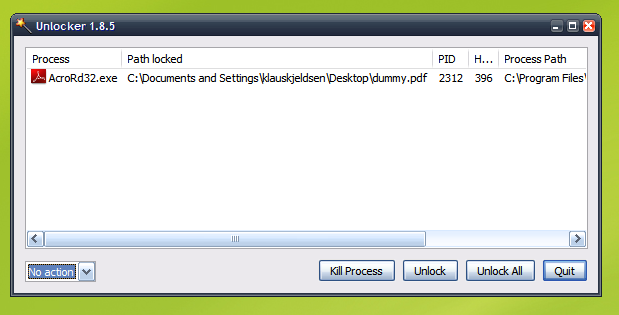
Product: Download
Who Lock Me
A similar tool to Unlocker.
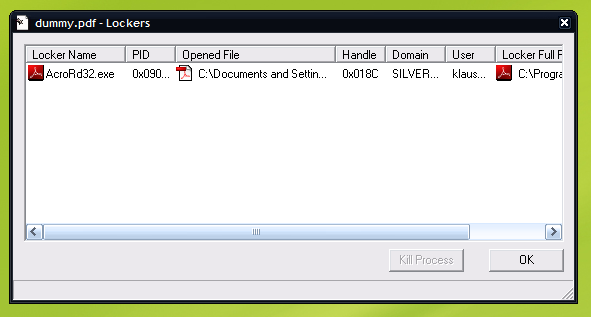
Product: Download
Opened Files View
Opened Files View displays the list of all opened files on your system.
Product: Download
Related Articles:
file lock tool • windows 2008 locked files • windows locked files • unlock locked folder bootcamp • windows 2008 locked file • file is not currently in use • viewing file locks • os x windows server files locked • make sure the file is not write protected • find locked files or folderes • how to identify folders being used on windows • cannot delete pim: there has been a sharing violation • locked files in folders • windows xp user view locked • locked files win2008 • windows dump file that is locked access • how to view locked windows files on mac • windows server 2008 view locked files • list opened files directories in windows • burn file locked • wholock windows file • locked files list • locked files • view locked windows files • unlock file in use • who lock me download • schannel is being used by another person or program • windows server 2008 locked files • why are folders and files locked • list locked files in windows • view file locks • file locked by process • it is used by another person or program itunes • cannot rename file being used another person program • • windows file locked by another user • windows 2008 locked directories • windows 7 view files currently in use • cannot rename normal: it is being used by another person or program • locked files windows 2008 • view locks on file • who locked me download • identify locked files windows • lock files in directory with vb6 • windows2008 lock file • list of locked files • windows 2008 release lock file • how to release locked file on windows 2008 • locked files windows • view locked files windows 2008 • cannot delete dk files • avg 9 0 locked files normal • cannot move 11 it is being used by another program or person • how to unlock files in xp • access denied source file may be in use copy • nokia 6300 shows access is denied to open a file using file explorer • find user lock windows file • identify lock file windows • view locked files windows server 2008 • mac locked files windows equivalent • windows 2008 release locked file • file lock tool • windows 2008 locked files • windows locked files • unlock locked folder bootcamp • windows 2008 locked file • file is not currently in use • viewing file locks • os x windows server files locked • make sure the file is not write protected • find locked files or folderes • how to identify folders being used on windows • cannot delete pim: there has been a sharing violation • locked files in folders • windows xp user view locked • locked files win2008 • windows dump file that is locked access • how to view locked windows files on mac • windows server 2008 view locked files • list opened files directories in windows • burn file locked • (12.4338 ms)


about 2 years ago
Thanks, these are very useful tools!
about 2 years ago
I really wish I had found your blog earlier, I had a few folders that were giving me trouble, namely the temp, and I ended up reformatting my machine. I’m slapping myself.
about 1 year ago
Thanks i have such type of folders on my hard disk, this s/w will certainly useful for me, i was thinking of this software recently. Thanks for the post
about 1 year ago
that was amazing
Thanks alot