
Here is a freely available plugin to make the Nokia 6300 work using iSync, and it is actually fairly easy to make a such plugin, which encompass the solution described in my previous post on the Nokia 6300 iSync issue.
Here is what to do:
- Download the Nokia 6300 iSync plugin
“UPDATED 28MAY2008″ - Extract the Nokia6300.phoneplugin.zip (your browser might do it for you).
- Quit iSync if its running
- Double click the Nokia 6300 Plugin
- Drag and drop the green folder on the blue one
[ad code=1 align=left]
-
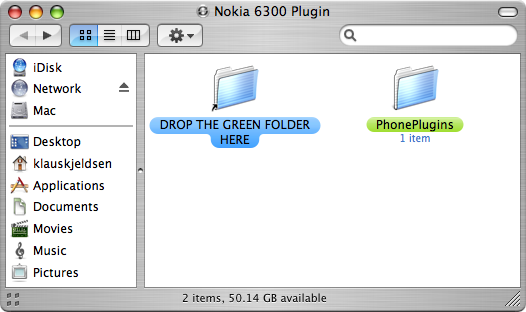
- Start iSync, and the Nokia 6300 should be supported
Additional notes and issues:
- iSync only synchronizes the contacts you have on the phone and not on the SIM-card. View this comment.
- Additional Mac software for Nokia Phones
Related Articles:
- Nokia 6300, iSync Plugin, and Contact Photos
- How to iSync a Nokia 6300 on Mac OS X
- Nokia 6300 Mac OS X Theme
- Nokia 6300 – Apple iPhone Theme
- Nokia 6300 Firmware/Software Update Download
- Setup Internet Connection via Bluetooth using Nokia 6300 on Mac OS X
- Syncronize Google Calendar with mobile phones using GCalSync
- iPhone Theme for Nokia Phones
- Java SSH Client for Nokia phones
- Setup and Use GMail on Your Phone

It works great. Just need to pair it. you guys are great.
1 question . Where should I put the plugin folder?
Pingback: CoSTa's Family Page
Thanks very much for this, just wanted to mention a problem i had and its solution for other people. i’m using isync 3 in leopard but had already paired my phone before installing the plugin and it didn’t work. just unpair and repair then launch isync and it should work
thanks again
Pingback: P!LE » Blog Archive » iSync - Nokia 6300
great piece of software!
thanks!!
Perfect! Thanks!
Beautiful, worked lovely, thanks very much…
works perfectly, thanks a lot for this great plugin !
works perfektly, although only via USB.
THANKS a bunch anyway for this great plug-in. Just don’t know why NOKIA can’t provide that.
Cheers Klaus .. perfecto .. just needed to back up my contacts .. phew!! .. Happy New Year!
Just to add my thanks to the list. A great plug in. I had a bit of flakiness with isync finding the 6300 after the first synchronization, but another cable worked fine. Nokia great phones – awful software. Thanks for the fix!
Thanks a ton! I was almost going to discard the the phone before I just came across this.. 2 thumbs up!
for those who cannot get isync to recognize the plugin, you have to place plugin actually in the isync Package. pluging does NOT work when placed in Library or user/Library. Select iSync app., show package contents;
navigate to /Applications/iSync.app/Contents/PlugIns/ApplePhoneConduit.syncdevice/Contents/PlugIns
and drag the downloaded plug-in into this folder. works fine then.
Thank you a lot. It works fine!
No problems at all. Just read.
Perfect!!
Thank you very much!
It works perfectly.
Super! Many Thanks, it works and I have 2.4 too.
Only a little mistake – some Birthdays are synchronized as Meetings – but that doesn´t matter.
Greets from Hamburg, Germany
Stefan
wow. works fantastic!!
would have gone nuts copying all my contacts into my new 6300…
saved me a LOT of time.
thanks!
New automatic plugin works great.
A Nobel prize for your effort.
you saved my life I was already panicking that I bought the “wrong” phone got all synchronised now. thank you very much.
Thanks a million for this! I thought I’d be sending the 6300 back, which would be a shame, as it’s a great phone.
However, I am having an issue in that iSync is reporting that synchronisation failed, as is the phone, but the initial sync seems to work. Only problem is, iSync tried to start the process again from first sync every time, which means I really have to wipe the phone each sync and only sync in one direction, or risk getting two entries of everything by choosing “Merge Data” in the iSync preferences. Anyone have suggestions?
It’s brilliant that you’ve done this, as otherwise I’d be sending it back.
Thank you Klaus for this nice solution. I’ve been using it on Tiger and Leopard for some time.
Anyone came across any issues when syncing To-do items from 6300 to iCal? When I set due date for To-do item lets say for “today” it appears as “yesterday” in the iCal To-do list.
thanks guys
Works great, thanks!
Works great on 10.5.2, thanks a lot!
I havent been able to instal, it corectly
It stills appear the green folder as a unix executable file.
Is any body outthere that can help.
Many thanks for the plugin
TOPS mate! thanks so much.
have been struggling for years to try and get my phnoe to sync with my PC – tried endless nokia forums etc etc. so boring and fruitless.
recently bought a pre-loved imac running 10.5.1 and added your free plugin and voila!
thanks again
nic
:]
Thanks for the plug in. Does it work for Entourage? I use this and would need it to sync with it.
Thanks
Many thanks – works perfectly with imac/leopard.
Just adding another vote of confidence that this works for Leopard 10.5.2. Contacts and calendar all syncs via bluetooth perfectly – this makes me very very happy.
Thanks heaps ‘n’ heaps!
Many thanks for this – it works perfectly with 10.5.2
Thanks a lot, now it’s only a poor battery and grilling of my ear, when I’m talking, that makes me dissatisfied with this phone
Awesome! ty!
Very Nice! Works perfectly indeed.
Works great except for one little thing – the names in the contacts on the phone have their first and surname reversed. Is there any reason for this? I can’t find any way of changing this behaviour.
thank you so much!
Thanks so much for your effort. It works fine.
It is great that you are working with options for using Mac with many phones – highly appreciated….
Could you tell me if you are working on a plug-in for the Nokia 6301?
thank you
A
Super solution
Guus
Thank you my friend. Love to you and your’s. I bought 2 6300s yesterday for my wife and I. .A bitter feeling ensued after clumsily messing and not being able to sync with my calender.
It’s brilliant to get this simple (even for me) softwear, free, from someone I have never and will probably never meet.
Does a pile of good for ones hope in humanity. Really.
Good work fella. works like a dream cheers
Works great for iSync version 3.0 (568.0)
How/where do you figure out to make software like this?
Thanks so much.
Marc
Thanks so much, works beautifully. One slight problem some events seem to be missing from my calendar. Anyone else have this problem or know a solution?
Pingback: Scrapbook » Nokia 6300 & iSync
Thanks Klaus, yours was the only solution that worked, thanks to your simple directions and image instructions. Cheers!
Thanks Klaus, this is great.
I am still having the problem mentioned above re all-day events in iCal appearing +12 hours later in my 6300 (I am in New Zealand). I’ve checked that MetaClasses.plist is set to “false” and have reset the 6300 — all-day events are still time-shifted. (Appointments, however, are correct.)
For now I’ve turned off synchronising all-day events (in iSync). But would love a solution to this last problem if there is one.
Notwithstanding this problem, I too am hugely grateful for this plugin — thanks so much!
Klaus, I may have answered my own question…
I just read the blog . The problem seemed related, albeit on a different Nokia phone. So I tried changing the value of “AllDayEventFormat” in Metaclasses.plist from “AllDayEventCategories” to “AllDayEventCategoriesAndMidnight”. To my complete surprise, it worked! All-day events in iCal now appear in my 6300 on the correct days (i.e. not shifted one day later)! All other calendar events also appear correctly.
NB: As you will have guessed, I have absolutely no idea what I am doing — so can’t rule out that this change hasn’t caused some other problem.
Would be very interested in your comment — does this make any sense to you? Could it be helpful to others??
thank you guys for the support
Help. I have been trying endlessly to make my 6300 sync with my Mac, but can’t. I have iMac, isync 3.0.
When I connect (using the Nokia mode, Print & Media mode, or Storage media mode), iSync won’t even recognize the phone and won’t let me add it (trying to do it using the Add Device option).
So obviously, I can’t sync the phone because I can’t even get it recognized on the Mac.
Anyone have a solution for this?
Thanks.
Waaah… plugin installed fine and my 6300 is recognised, but I’m getting the following error: [6300] There was an error getting data from the phone. The synchronization may have been cancelled on the phone.
Device “6300″ synchronization failed
Anyone have any ideas? I’m ready to pull my hair out…
nice one.
Wayhay!!
Thanks you life saver you! 
Excellent – easy and simple to use. You have saved me hours and a sore thumb! Good work, my friend.
This works great. To get it to sync my all-day event correctly (and not as 14:00-14:00 appointments) i had to change the value of the “AllDayEventFormat†key to “AllDayEventCategoriesAndMidnight†in the MetaClasses.plist. It now syncs everything perfectly.
I found my solution on this website … haven’t tried adding the extra lines to MetaClasses.plist, as the changing the “AllDayEventFormat” key was enough to make it work for my Nokia 6300.
Good luck
Hi Esben, thanks for your advise. I tried your solution, and looked a bit more into it, and found that the value can be set to “AllDayEventWithoutTime”, which I found to be an even better solution. With this option all-day-events are shown without start-end times, and instead shown with the “memo” icon.
Other alternative values for the “AllDayEventFormat” key are:
- AllDayEventCategories (old value)
- AllDayEventCategoriesAndMidnight
- AllDayEventMidnight
- AllDayEventWithoutTime (new value in the plugin)
I have released the plugin with the better support for all-day-events, so just download and be happy.
hello
I don’t have bluetooth on my mac. does anybody have a USB solution that will work?
thanks
Thank you !
Can it sync my notes from the Nokia 6300 to the mac?
Hi, thanks a lot, it helps me well!
enjoy
Sam
Is it possible to Sync my text messages (texto) with my computer?
thanks a lot Klaus, your plugin worked finally for my wife’s new Nokia 6300 after a few unexplained bluetooth pairing failures. Mac mini G4, OS X 10.4.11 and isync 2.4 (501.2). Fred from Germany.
Thanks Klaus and all comments Happy Happy Joy Joy,
My Nokia 6233 is now syncing over bluetooth thanks to this marvelous idea. Quite simple text replace of all 6300 to 6233 in all files of the plugin and I was ready and set. Only have to change the picture now
Inspite of the Nokia 6233 being bigger and heavier then the 6300 I am going to keep it since it remains usefull now i can sync. Super.
Peter
I got my new Nokia 6300 yesterday and was mortified to find I could not download contacts – that is I want to download from my Mac to the phone which is empty at the moment, and then I will want to synch it on a regular basis.
I downloaded your plug-in but I can’t get it to work. I have paired the phone to the Mac and can get it to connect for a short while but when I try to get a new Device with iSynch it finds the phone but tells me that it is not compatible. I have 10.4.11 operating system and iSynch version 2.4
Please help!
Thanks !
Plugin downloaded, after my nokia6300 paired with MacBook Pro with Leopard 10.5.4. on it, finally connected the nokia phone to the network and the syncronization 100% working for me.
Great job, thanks once again.
Some people might be interested in this version that does all-day events correctly:
http://aaron.gy/stuff/nokia6300
Oops, I see that you updated yours as well to fix this issue, but in a different way, maybe better.
Thanks!
You should sell this plugin to Nokia. hahaha.
Works!
thanks for this cool plugin, works fine!
Downloaded your plugin a couple of weeks ago, and had it working fabulously! Then our mac auto loaded updates to isync, meaning we are on version 3.0.2, now isync no longer works again. I have re downloaded your plugin, extracted…etc, restarted computer, etc etc, and re-paired nokia6300, to no avail. Any tips, can you see any diff’s in coding that may of affected the plugin? Was very very happy before i nievely allowed apple to update isync. We would appreciate your help!
from a desperate aussie.
Hi.
Downloaded and installed your latest Plugin for Nokia 6300, and i want to connect via USB to iSync, but iSync does not found my phone. Can you please help me?
Works fine on my iMac. Thanks.
Man, this is great! Thank you again. I used your solution before you offered the plugin.And now this ready-to-use solution.
Thanks
Thank you so much for this plugin. It works
Thanks a lot!
Really appreciated that!
Hi,
My 6300 works only with Contacts (syncing with AddressBook on OS X), not with iCal. I’d hope that your plugin could help – but unfortunately not, it doesn’t work at all.
Reason is, that after installation I tried to use your newest plugin on my Mac OS X 10.5.5 iSync comes up with a message saying I have to uninstall the plugin before it wants to let us “play”.
Hmmm…..
Der sker flg. efter installation af 6300-plugin:
når jeg klikker på iSync-ikonet, kommer programmet op med flg. meddelelse:
iSync kan ikke åbne pga. problemer med et tilbehør
Følgende tilbehør virker ikke med denne version af iSync. Klik på pilen for at vise tilbehøret, flyt det eller slet det, og åbn derefter iSync igen.
• Nokia6300.phoneplugin
Eneste klik-mulighed er derefter “Slut”. iSync kan vel ikke fortælle mere tydeligt, at pluginet ikke virker – men det er da underligt, nÃ¥r sÃ¥ mange andre har haft succes med det?
Hi everybody
I just purchased Nokia 6300 but I have Isync 3.0.2 and I have tried to download the plug ins and do it both ways (the ways Klaus suggested) but unfortunately I only get
The following plug-in does not work with this version of isync.
Nokia6300.phoneplugin
Any suggestions?’
I’ve tried to drag and drop the green folder into the blue but the system dis not allow me to do it ( not enough privileges ( i’m the administrator) There is anothr solution?
thanks!
Thanx mate, finally i can sync my phone!
IT WORKS NOW!!!
at first it was also showing the “incompatable” msg and I cannot startup isync… then I went back to undo the XML script and removed the NOK6300.tiff…..
Redo this plug-in….. and IT WORKS!!!!
WOW…. I can now sync everything from contact to calendar! My wife is so gonna love me!!!! thx for the post! Marvelous work!
Henry
The plugin worked just fine, but I had to be careful not to delete other plugins installed prior to this one (on Step 5). As the Plugins folder was already created all I had to do was to copy the content. 10x man!
Great! Thank you!
Thanks!
Cheers,
Maggy
I had the same issues as Antonio…
“I’ve tried to drag and drop the green folder into the blue but the system dis not allow me to do it ( not enough privileges ( i’m the administrator) There is anothr solution?”
So wonderful, I’m so happy to synchronize my phone and not to buy another one !
Wow, thanks! Works great.
Hi Klaus,
thanks a lot for this plugin.
I noticed that the company name is not synced to my 6300. Do you have any thoughts on how to solve this?
Regards,
Frank
brilliant – thanks, Klaus. This saved me hours of typing in all my contacts.
Ann
Dear Klaus,
Thanks ever so much for providing this great service.
I’m a bit stuck on the iSync plug in as I also get the issue with “The operation cannot be completed because you do not have sufficient privileges for some of the items”.
Would you be able to help?
Thanks very very much,
Fabio
Hi,
Thank you for this wonderful plugin!
It’s working fine, except for one thing:
When I have names that consist of multiple words (Like we have in Belgium: Van de Walle, Van Oost), the plugin puts the first words as ‘second name’ in Address book, and a subsequent sync causes the names in my phone to change to only the last word.
Could you change this in the plugin, or send me the source code so I an do this myself, cause it’s been bugging me for a while now
Thanks!
many thanks! works fine for me.
Thanks man really appreciate your effort on this…
It’s work for me .. Thousands Thanks!
Hi,
I want my messages from my phone on my Mac.
Is that possible? I only have my adressbook from my phone on my Mac.
Hope you can help me….
Thanks
Thank you a thousand times! It works like a charm.
this has worked for me many times over(contacts and ical) i am grateful for the effort that has been put in, it has made a very basic nokia phone much more flexible for me.
Worked first time for me on black Nokia 6300, MacBook and ActiveSync 3.0.2 – the wonders of drag-n-drop application plug-ins
(I tried the old fashioned do-it-by-hand way editing plist etc yesterday and didn’t manage to get that way to work.)
seems to be a great plugin, but unfortunately doesnt work for me. calendar entries are only synced one-way, from mac to phone. calendar entries that i made on the phone, after syncing with my mac, never show up in ical. i use isync 3.02. hmmm…